
Tutorial 12 - Optimize#
Welcome to this tutorial outlining the Optimization process in RCAIDE. This guide will walk you through the code, explain its components, and highlight where modifications can be made to customize the simulation for different vehicle designs. It uses the pieces from tutorials 11 and 12 to create a simple optimization problem.
Header and Imports#
The Imports section is divided into two parts: general-purpose Python libraries and simulation-specific libraries. Note, how the earlier tutorials are imported.
[1]:
# Optimize.py
# Created:  Feb 2016, M. Vegh
# Modified: Aug 2017, E. Botero
#           Aug 2018, T. MacDonald

# ----------------------------------------------------------------------
#   Imports
# ----------------------------------------------------------------------

import RCAIDE
from RCAIDE.Framework.Core import Units, Data
import numpy as np


import import_ipynb
import Tutorial_15_Vehicle as Vehicles
import Tutorial_10_Analyses as Analyses
import Tutorial_11_Missions as Missions
import Tutorial_14_Procedure as Procedure
import Tutorial_13_Plot_Mission as Plot_Mission
import matplotlib.pyplot as plt
from RCAIDE.Framework.Optimization.Common import  Nexus
from RCAIDE.Framework.Optimization .Packages.scipy import scipy_setup
Matplotlib created a temporary cache directory at /var/folders/r4/4h9x29hj6f95kyhjsltxc6_00000gn/T/matplotlib-fwch3wf2 because the default path (/Users/aidanmolloy/.matplotlib) is not a writable directory; it is highly recommended to set the MPLCONFIGDIR environment variable to a writable directory, in particular to speed up the import of Matplotlib and to better support multiprocessing.
Fontconfig warning: ignoring UTF-8: not a valid region tag
Matplotlib is building the font cache; this may take a moment.
Analysis Setup#
The setup section creates the optimization problem through two parts: first defining the problem and its constraints and then appending the analyses and vehicle of interest.
### 1. Defining the Problem |
|---|
### 2. Append Analyses and Vehicle |
Here, the vehicle, analyses, missions, and procedure are appended to the nexus each within their own container. The summary container, where results are stored, is also created. |
[2]:
def setup():

    nexus = Nexus()
    problem = Data()
    nexus.optimization_problem = problem

    # -------------------------------------------------------------------
    # Inputs
    # -------------------------------------------------------------------

    #   [ tag                   , initial,     lb , ub        , scaling , units ]
    problem.inputs = np.array([
        [ 'wing_area'           ,  92    ,    50. ,   130.    ,   100.  , 1*Units.meter**2],
        [ 'cruise_altitude'     ,   10    ,    8. ,    12.    ,   10.   , 1*Units.km],
    ],dtype=object)

    # -------------------------------------------------------------------
    # Objective
    # -------------------------------------------------------------------

    # [ tag, scaling, units ]
    problem.objective = np.array([
        [ 'fuel_burn', 10000, 1*Units.kg ]
    ],dtype=object)

    # -------------------------------------------------------------------
    # Constraints
    # -------------------------------------------------------------------

    # [ tag, sense, edge, scaling, units ]
    problem.constraints = np.array([
        [ 'design_range_fuel_margin' , '>', 0., 1E-1, 1*Units.less], #fuel margin defined here as fuel
    ],dtype=object)

    # -------------------------------------------------------------------
    #  Aliases
    # -------------------------------------------------------------------

    # [ 'alias' , ['data.path1.name','data.path2.name'] ]

    problem.aliases = [
        [ 'wing_area'                        ,   ['vehicle_configurations.*.wings.main_wing.areas.reference',
                                                  'vehicle_configurations.*.reference_area'                    ]],
        [ 'cruise_altitude'                  , 'missions.base.segments.climb_3.altitude_end'                    ],
        [ 'fuel_burn'                        ,    'summary.base_mission_fuelburn'                               ],
        [ 'design_range_fuel_margin'         ,    'summary.max_zero_fuel_margin'                                ],
    ]

    # -------------------------------------------------------------------
    #  Vehicles
    # -------------------------------------------------------------------
    nexus.vehicle_configurations = Vehicles.setup()

    # -------------------------------------------------------------------
    #  Analyses
    # -------------------------------------------------------------------
    nexus.analyses = Analyses.setup(nexus.vehicle_configurations)

    # -------------------------------------------------------------------
    #  Missions
    # -------------------------------------------------------------------
    nexus.missions = Missions.setup(nexus.analyses)

    # -------------------------------------------------------------------
    #  Procedure
    # -------------------------------------------------------------------
    nexus.procedure = Procedure.setup()

    # -------------------------------------------------------------------
    #  Summary
    # -------------------------------------------------------------------
    nexus.summary = Data()
    nexus.total_number_of_iterations = 0
    return nexus
Run the Setup#
This excerpt runs the optimization function.
It begins by defining the output, as the objective of the problem.
It then calles the scipy_setup function, which is the optimization wrapper. This function splits the presented ``problem`` variable into the required format for scipy. The type of solver, a Sequential Least Squares Programming (SLSQP) solver, is also defined. For more information on the solver refer to the RCAIDE and scipy documentation.
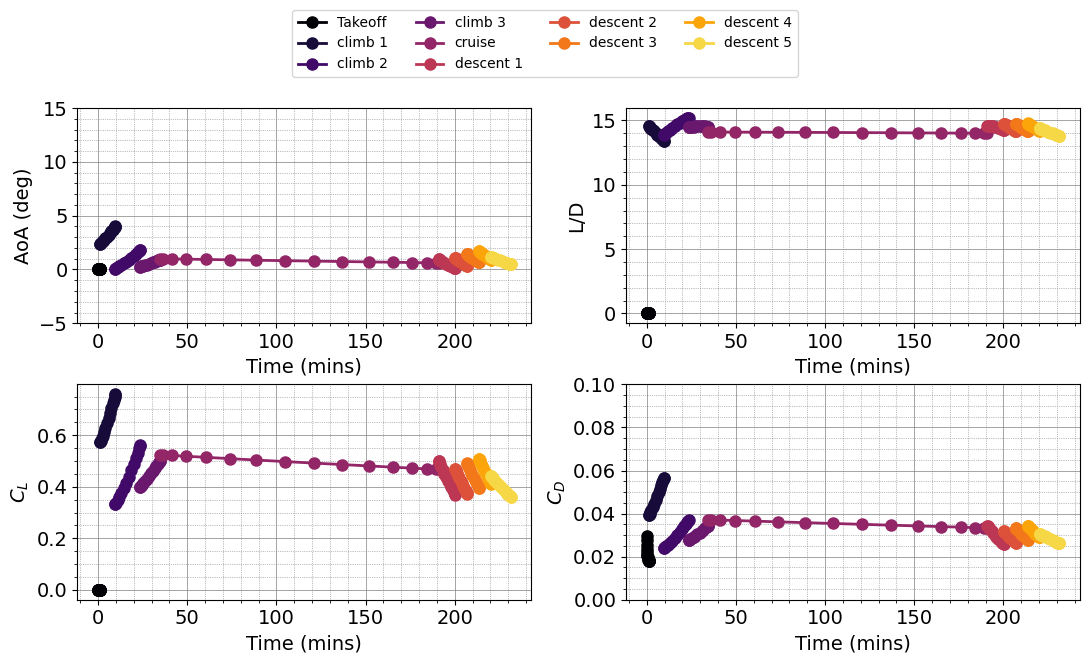
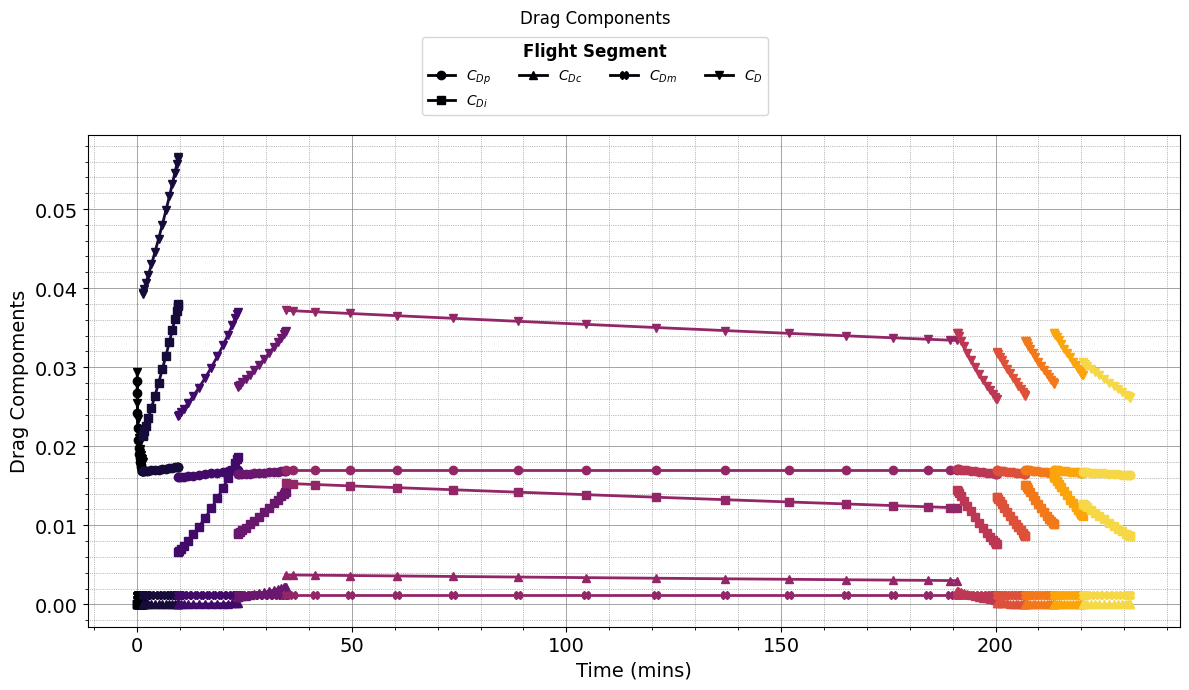
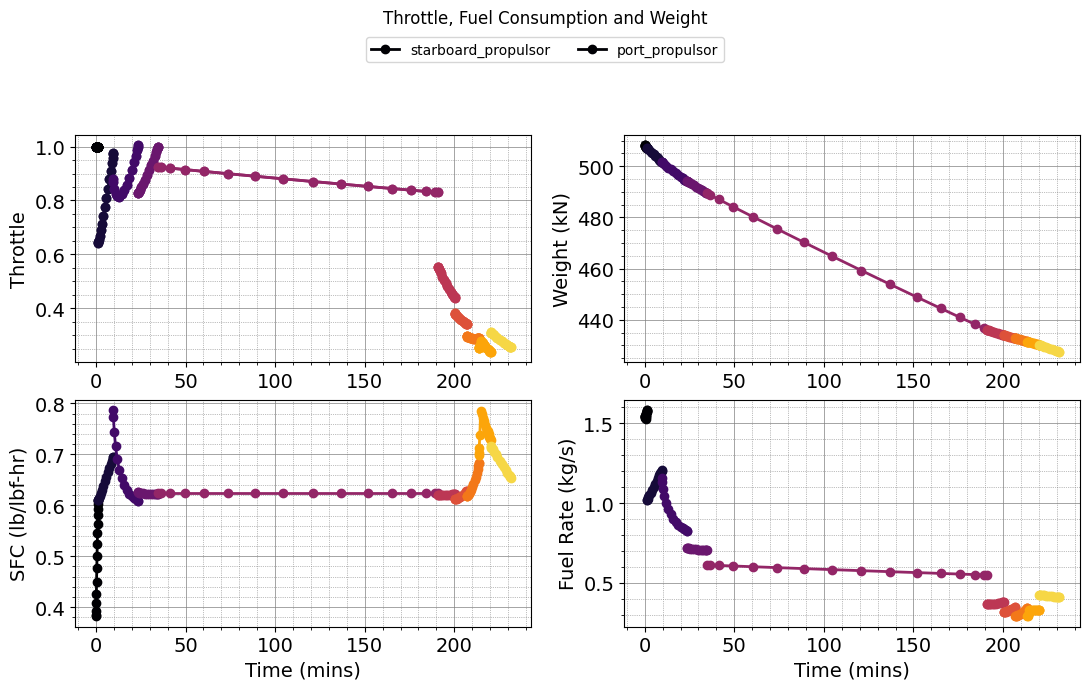
Finally, mision results are plotted and value of the objective varibale are printed. Over the course of an optimization, these values will be continuously updated.
[3]:
problem = setup()

## Base Input Values
output = problem.objective()


# Uncomment for the first optimization
output = scipy_setup.SciPy_Solve(problem,solver='SLSQP')
print (output)

print('fuel burn = ', problem.summary.base_mission_fuelburn)
print('fuel margin = ', problem.all_constraints())

Plot_Mission.plot_mission(problem)
plt.show()
Inputs
[0.92 1.  ]
Obj
[0.77891368]
Inputs
[0.92000001 1.        ]
Obj
[0.78101932]
Inputs
[0.92       1.00000001]
Obj
[0.78101992]
Optimization terminated successfully    (Exit mode 0)
            Current function value: 0.7789136753961072
            Iterations: 5
            Function evaluations: 3
            Gradient evaluations: 1
[0.92 1.  ]
fuel burn =  [7810.19924285]
fuel margin =  [8.6785417]
[ ]: